
Object Removal from Images
Paint over objects or people and the AI fills the gap with matching background
About the service
AI object remover: erase unwanted objects from photos
Upload a photo, paint over what you want to remove, and the AI erases it and fills the gap with matching background. Use it to remove a person from a photo, take out wires or a road sign, or clean up clutter around a product. Each variant costs $0.04, and the price is shown before launch. You need to sign in to run it, and the free daily bonus can pay for it.
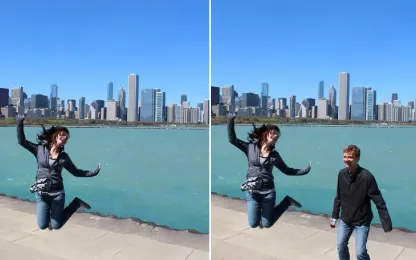
Before and after examples
How to remove an object from a photo
- Sign in and upload the image.
- Paint over everything you want to remove. You can mark several objects at once.
- Choose how many variants to get, from 1 to 8.
- Check the price and start the run. Pick the best variant and download it; no watermark is added.
There is no prompt to write: the AI decides what background should fill the painted area.
Painting a mask that leaves no traces
- Paint with a margin. Include some background around the object. A tight outline can make the AI draw something similar in its place: in our tests a tight mask replaced the tourist with another person and bread crumbs with lemon slices.
- Include shadows and reflections. A leftover shadow on the sand or a reflection in the water can lead the AI to rebuild a new figure from it.
- Zoom in for thin objects. For wires and similar details, zoom in and reduce the brush size. Use the eraser to fix overpainting and undo to revert a stroke.
- Ask for several variants. Each variant fills the area differently, and you pay only for the number of variants.
To replace the whole background or describe a change in words, use the AI photo editor. Its PhotoStab v6 model also works with a painted area but fills it with what you describe; see the guide. To add background beyond the frame, use the image extender; to cut a subject out onto a transparent background, use the background remover.
Files and limits
- Each run takes one image and returns 1 to 8 variants.
- Formats: JPG, JPEG, PNG, WebP, AVIF, HEIC, and HEIF, up to 15 MB.
- Width plus height must be between 128 and 18,000 pixels. Sides larger than 6,144 pixels are downscaled before processing.
- The area around the mask is processed at about 1.3 megapixels, so a large painted area on a big photo can look softer than the rest of the picture.
Uploaded files and results are stored for 3 days, or 30 days if your paid balance is at least $1. After that they are deleted automatically. See the privacy policy.
Pay for results, not a subscription
There is no subscription: you pay per variant, and the price is shown before launch. Object removal accepts the bonus balance, which can be restored up to $0.60 once per UTC day — enough for 15 variants a day. Recent paying users receive it automatically; others claim it on the Daily bonus page. See pricing and bonus terms.
Frequently asked questions
Is the AI object remover free? Yes, within the daily bonus: $0.60 covers 15 variants at $0.04 each. There is no unlimited free mode.
Do I need to sign up? Yes, to upload a photo and run the removal. You can see the price and examples without signing in.
Is there a watermark? No, results are downloaded without a watermark.
Why did something else appear where the object was? The mask was most likely too tight or missed the shadow. Paint a wider area and run it again, ideally with several variants.
Can I remove several objects at once? Yes, paint all of them on one mask, like the wires and the road sign in the example above. The price depends only on the number of variants.
Will the rest of the photo change? The AI redraws the painted area and a little background around it; everything else stays as it was. Very large images are downscaled to 6,144 pixels on the longer side first.
Can I use the result commercially? Yes, if the run was paid from the paid balance, subject to third-party rights and the service terms.
How long are results available? 3 days, or 30 days if your paid balance is at least $1. Download the file if you need it longer.
What's new
- Improved understanding of the context around removed objects
- More accurate removal of unwanted objects
Removes both small and large objects by completely redrawing a part of the image (fills in the removed areas).